Building in the cloud with Codex, safely
A full pass at letting Codex build and ship a backend unattended: instructions, permissions, headless runs, self-verification against traces, and who decides what gets provisioned.
For the last few months I've been building an environment where an agent can work on backend code without me watching it. I run Codex with approvals off and don't follow the output, which only works if everything around the run is doing the job supervision would otherwise do.
Prompting has been almost none of that work, since the mistakes that matter come from the agent filling in operational details nothing in the codebase told it, and those surface weeks later under load rather than in the diff.
These are the guardrails I've settled on: an AGENTS.md the model reads on every run, a sandbox policy for the shell it gets, codex exec for the run itself, a stack where the infrastructure isn't the agent's to guess at, a local environment with traces to check its own work against, and a preview environment for the pull request to land in before any of it reaches my AWS account.
What goes in AGENTS.md
Codex reads AGENTS.md on every run, merging from the outside in: ~/.codex/AGENTS.md, then the file at the git root, then any file in directories between the root and the working directory, with the closest file taking precedence on conflicts.
Conventions with a non-obvious answer are worth writing down, along with the commands that let the agent establish whether it's finished. Most of the rest is style guidance the model would infer anyway from the surrounding code.
# Orders API

Encore.ts application. One directory per service.

- Infrastructure is declared in code. Do not add Terraform, Dockerfiles, or
  docker-compose — `encore run` provisions everything locally.
- Migrations are numbered `N_description.up.sql` and append-only. Never edit
  an existing migration.
- Queries use tagged templates: db.query`SELECT ... ${value}`. Never the
  raw* variants, which take a plain string and will accept concatenation.
- Credentials come from secret("Name"), never process.env.

Before reporting done, run:
  encore check
  encore test
An agent with no verification command stops when the code looks finished, which for infrastructure code is usually some distance before it is.
Isolation: sandbox, container, or VM
An agent running with approvals off will eventually run a command you would not have approved. The common answers are a throwaway VM, a container, or a remote environment like Daytona or Fly's Sprites, and any of them are fine. Codex also ships its own sandbox, which is the lowest-friction option because there is nothing to set up. If you already run agents somewhere disposable, this section is optional and you can skip to the next one.
Codex executes model-generated commands under bubblewrap and seccomp on Linux, and Seatbelt on macOS, in one of three modes. read-only permits no writes, workspace-write permits writes inside the working directory while keeping .git read-only and blocking network access, and danger-full-access removes both restrictions. Approval policy is a separate setting. The codex sandbox subcommand applies a policy to any command without involving the model, which is how I check what a mode does:
$ codex sandbox -c sandbox_mode=workspace-write -- bash -c 'echo hi > ~/escape.txt'
bash: line 1: /home/andout/escape.txt: Read-only file system

$ codex sandbox -c sandbox_mode=workspace-write \
    -- bash -c 'curl -sm5 -o /dev/null https://example.com; echo exit=$?'
exit=6
Exit code 6 is curl's couldn't-resolve-host, so the lookup never left the sandbox.
Whichever route you take, isolation covers files and sockets and not the environment it inherits, so shell_environment_policy is worth setting alongside the mode. The config I run with:
sandbox_mode = "workspace-write"
approval_policy = "on-request"

[sandbox_workspace_write]
network_access = false

[shell_environment_policy]
inherit = "core"
inherit = "core" keeps PATH, HOME, USER, SHELL, TMPDIR and the locale variables, and drops the rest of what the shell was carrying.
Running tasks with codex exec
Once the file and the sandbox are in place there's nothing to sit and watch, so the run goes through codex exec rather than the TUI. It takes the task as an argument and the sandbox mode as a flag:
$ codex exec -s workspace-write \
    "Add an order-created event. Publish it from the orders service when an
     order is created, and add a subscription in notifications that sends a
     confirmation email using the existing sendEmail helper."
Dependencies are already installed by this point and a local Encore environment doesn't call out, so network access stays off for these runs and the tasks that genuinely need it are rare.
If the result comes back close but wrong, codex exec resume --last continues that session with its context intact. The bare codex resume picker skips non-interactive sessions unless you pass --include-non-interactive, so it won't find a codex exec run on its own.
Infrastructure the agent doesn't have to invent
Asking for an order-created event in an Express and Terraform project produces something like this:
resource "aws_sqs_queue" "order_created" {
  name                       = "order-created"
  visibility_timeout_seconds = 60
  message_retention_seconds  = 1209600

  redrive_policy = jsonencode({
    deadLetterTargetArn = aws_sqs_queue.order_created_dlq.arn
    maxReceiveCount     = 5
  })
}
A visibility timeout has to exceed the handler's actual runtime, which the application code states nowhere, so that number and the two beside it are guesses. maxReceiveCount of 5 is correct if the handler is idempotent and an incident if it isn't. terraform validate accepts all of it, and so does the sandbox, since writing a file inside the workspace is what workspace-write is for.
In Encore those same parameters exist, with defaults, so the declaration carries none of them until you want one changed:
import { Topic, Subscription } from "encore.dev/pubsub";

export interface OrderCreated {
  orderID: string;
  customerID: string;
}

export const orders = new Topic<OrderCreated>("order-created", {
  deliveryGuarantee: "at-least-once",
});

new Subscription(orders, "send-confirmation", {
  handler: async (event) => {
    await sendEmail(event.customerID, event.orderID);
  },
});
Publisher and handler share one type, so a field added on one side and missed on the other fails to compile instead of arriving as undefined at runtime. The other declarations work the same way: a typed endpoint, a database with its migrations, a secret whose value never enters the repository.
Encore statically analyses the application at compile time into a graph of the services, endpoints, topics and databases it declares, called the application model, and provisions from that. There's no second set of files for the agent to keep in sync, and a declaration that doesn't parse is a build error instead of a resource that quietly never appears.
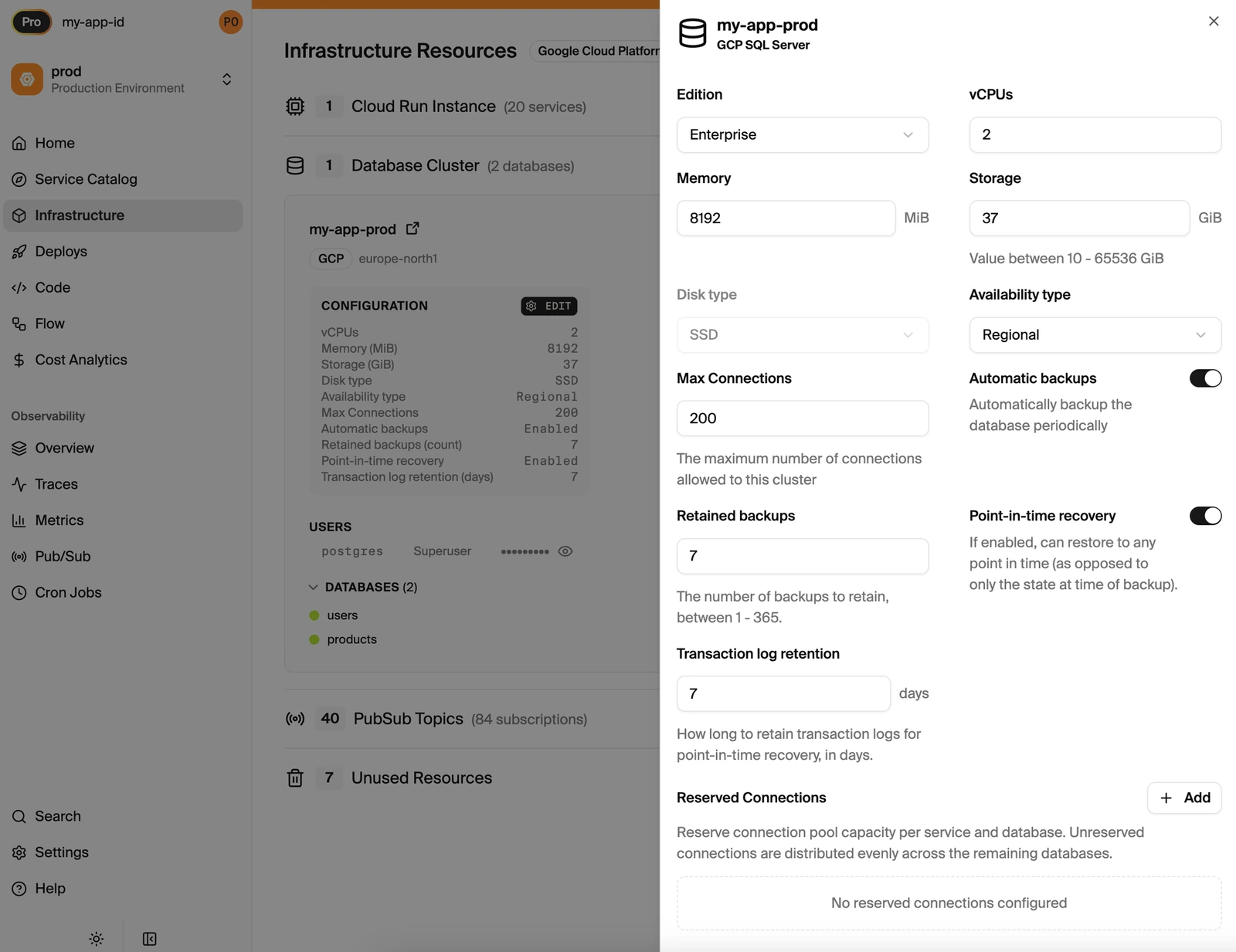
Compute, memory, storage and backup policy are set per environment in the dashboard rather than in the code, and take effect on the next deploy:
Verifying against encore run
Static types settle the contracts, and everything about behaviour comes from running the thing, which locally is one command:
$ encore runThis boots Postgres, the Pub/Sub broker and object storage locally, and serves a dashboard on http://localhost:9400 with a service catalog, an API explorer and distributed tracing. Cron jobs are disabled in the local environment, so an agent iterating on a schedule won't fire it.
After publishing an event the agent can read the publish, the subscription delivery, the queries the handler ran and the timing on each, which is a different class of evidence from a successful compile. With the encore check and encore test lines already in AGENTS.md, the loop closes without deploying anything.
Reviewing the diff
Codex reviews diffs through a separate non-interactive command, worth running against the agent's own work because the review starts without the context that produced the code:
$ codex review --uncommitted
$ codex review --base main
Preview environments and provisioning
A pull request creates a preview environment named pr:N at https://pr72-$APP_ID.encr.app, running the full infrastructure. That's where I actually look at what the agent did, since a diff won't show a slow query or a subscription that never fires. Databases can be branched from an existing environment so the preview has realistic data, configured under App Settings > Preview Environments, provided the app uses Neon as its database provider.
The code determines which resources exist in production, and not what they cost or how large they are. A Topic is in-memory locally and SQS with SNS in your own AWS account. A SQLDatabase is Docker Postgres locally and RDS in production. Services run as a local process, then on Fargate or EKS. Compute type, instance sizes and database configuration are set in the Encore dashboard or the cloud console, and the two stay in sync, which keeps the sizing decisions outside what an agent can change.
What I still read
The setup removes the mistakes that come from an agent inventing values it has no basis for, which was most of what made unattended runs unworkable. I still read the diff for the rest: whether the migration is reversible, whether the handler behaves when a message is redelivered, and whether the feature is the one I asked for.
