I ported Omarchy to a phone
I gave an agent an old Pixel 4 and asked it to port Omarchy to it.
A few days ago, I decided to buy into the hype and install Omarchy on my machine. I'm no stranger to Linux - I used it for years before eventually switching over to macOS, so the initial experience was fun because all the "rice" that looked cool back in the day was now within reach, without having to spend countless hours figuring it out and setting it up (something I didn't like much).
But, where things got interesting was realizing that I could now spin up stuff on Linux within minutes just by prompting an agent - whereas before, every change or configuration meant hours of learning, reading and watching YouTube videos. Doing that research and tinkering has its charm, don't get me wrong, but in my case, I would always give up after a few hours - I preferred defaults.
On my Mac setup, I use the Sonos app to manage the speakers in my household and the app is janky, to say the least. For Linux, there is no Sonos app. So my first experiment ended up being this prompt:
And 2 minutes later - I had a solution that was significantly better than the official Sonos app I had on my Mac. This is what it looks like:
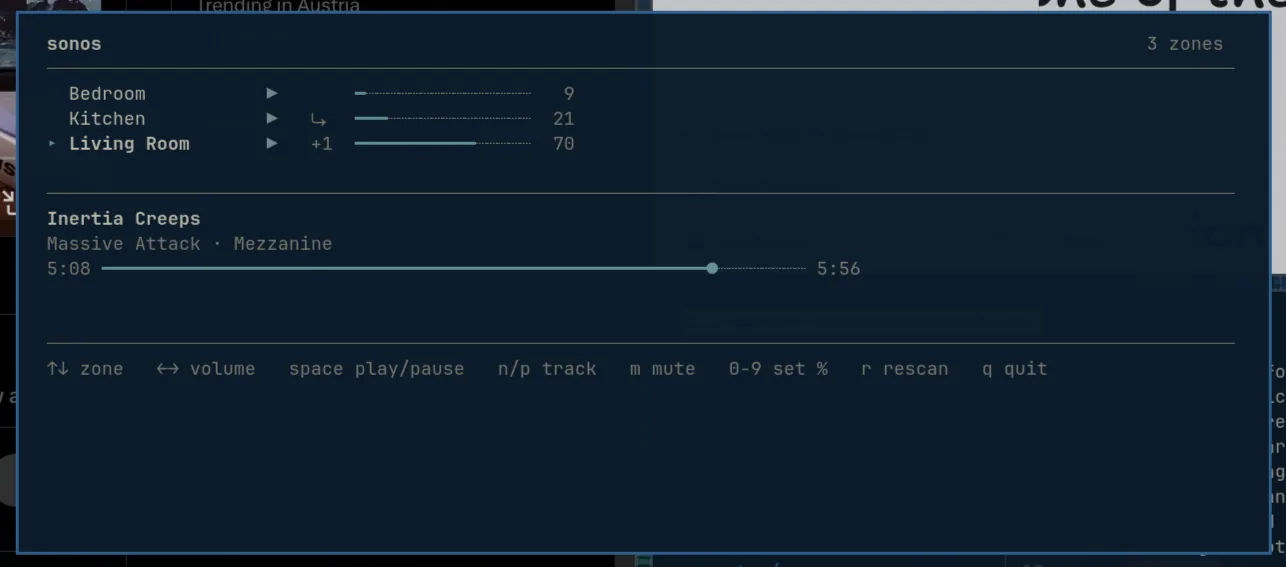
This blew my mind as it was fully autonomous - I didn't have to deal with stuff like code signing, permission prompts, etc., which is usually the case on macOS (don't ask me about Windows, haven't used it in 20 years).
Now this is where the phone part comes in. I thought to myself: what if I were to take things to the next level and bring this "build whatever you want in seconds" workflow over to a phone - an "ecosystem" that's, at least related to quickly building stuff, vastly different from a desktop OS (I'm not going to go into detail about how it's different but if you've ever tried building an iOS/Android app, you'll know what I'm talking about).
That's when I decided to not let my dreams be dreams and I picked up an old Google Pixel 4 from my drawer, plugged it into my PC, spun up Claude and fed it a single short prompt that kicked this entire journey off:
Half an hour later and a few course-correction prompts - I had Linux running on my Pixel 4 using Arch Linux ARM, Hyprland and a bunch of "opinions" from Omarchy.

Unfortunately I don't have a screenshot of how the first iteration looked - this is after turning the Hyprland setup from a desktop-y setup to a phone-y setup.
What you see in the image, timeline-wise, lies between the first successful boot and the current state of the port. The part between the first successful boot and the image above was the trickiest one to do and it revolved around turning the default Hyprland setup into something mobile-friendly.
While the prompting was nothing too extraordinary - it required a lot of explaining over and over how the homescreen launcher should behave and how it needs to mimic Android/iOS standards. We mustn't forget that Hyprland is, at the end of the day, made for desktops - it has no concept of a homescreen, a back button, an app switcher or a notification shade and even its gestures are made with touchpads in mind (it doesn't support one-finger gestures which is, obviously, a slight problem on a phone).
A blurry video from Reddit showing Hyprland on a Fairphone 5. This is roughly what my first iteration looked like and, in my opinion, not a particularly ergonomic way to use a phone - which is why I ditched it.
To get around that, Claude ended up building a lot of the missing "phone logic" around Hyprland - the homescreen is basically a layer that always sits behind the apps, apps are forced to open one at a time on a separate workspace and a small daemon reads the touchscreen directly and turns swipes from each edge into things like home, back and the control center. Even something as simple as "back" had to be figured out because there is no universal back action in Wayland.
Then there were a million smaller things like the launcher randomly changing the number of icons per row because the 1080px display is actually only 432 logical pixels after scaling or the on-screen keyboard working the entire time, but opening behind the launcher. These are all things I had never thought about before because we're all just so used to Android and iOS doing them for us.
Next came porting the Omarchy web app store. This part was pretty simple because web apps on Omarchy are basically .desktop files that open a website in Chromium's app mode. I took the same catalogue Omarchy ships with and put a touch-friendly interface in front of it, so tapping WhatsApp writes the file, adds it to the homescreen and gives it its own window that the app switcher can recognize (you can also paste in any URL you want).
Installing a web app from the Omarchy app store.
Next came being able to build apps in minutes without blockers, which is why I wanted to do this entire thing in the first place. Since Claude Code can run directly on the phone, I can open it, describe the app I want and, a few minutes later, it shows up on the homescreen ready to use - without having to move over to my computer and then use Xcode or Android Studio to build and install it.
Given that the phone is just running Linux, Claude Code works on it pretty much the same way it does on Omarchy - it can access the filesystem, run commands, install packages and put whatever it builds directly onto the homescreen. On iOS or Android, Claude can write the app but I would still need to build it, sign it and figure out how to get it onto the phone, whereas here it can put the app straight onto the homescreen.
If what I'm building is local, it just lives locally on the phone. For anything that needs a server I use Encore because its primitives let Claude define things like databases, APIs and cron jobs directly in the application code, meaning it can generate the entire backend and drop it onto my AWS account without me having to leave the phone and set everything up separately.
A database, for example, is literally this:
import { SQLDatabase } from "encore.dev/storage/sqldb";

// Runs locally, then Encore provisions it in my AWS account on deploy.
const db = new SQLDatabase("todo", { migrations: "./migrations" });
If you're wondering where the AWS configuration is: that lives on the environment level in Encore's dashboard rather than in the application code, so Claude only needs to describe what the app needs here.
Building an app with Claude Code directly on the phone.
And finally, a nice gimmick: theme sync. Omarchy already has a hook that runs whenever the theme changes, so I had Claude attach a small script to it which finds the phone over the local network and sends over the theme's colors and the wallpaper via SSH. The phone then applies them to its own interface, meaning whenever I switch the theme on my desktop, the phone switches to the same one a second or two later.
Changing the theme on my desktop and watching the phone follow.
Now, these are the cool things - there's a lot of "uncool" things which are probably more important than all of the above. To get to the point where I could complain about homescreen animations, Claude first had to build and patch a Linux 6.15 kernel for the Pixel 4, get the AMOLED display running at 90Hz, bring up the Adreno GPU and multitouch and then extract the right firmware and calibration files from the stock Android image to make Wi-Fi work. It also got the Bluetooth controller running, battery percentage and charging reporting correctly, the power button behaving like a power button and Wi-Fi reconnecting after a reboot.
Even putting the phone to sleep ended up requiring a kernel patch because the touchscreen driver was waiting for an Android-specific display notification that doesn't exist in mainline Linux and, as far as Linux was concerned, the touchscreen was permanently busy. After fixing that, suspend and resume worked with the display, Wi-Fi, Bluetooth and USB connection all coming back with it. It's the kind of stuff nobody notices when it works, but without it this would just be a very small desktop that needs to stay plugged in and awake forever.
At the time of writing, this is where things stand:
| Part | Status | What works / what's left |
|---|---|---|
| Core system | Working | The phone boots into Arch Linux ARM with Linux 6.15, a 90Hz display, GPU acceleration and multitouch |
| Wi-Fi | Working | It finds and joins networks and reconnects by itself after a reboot or suspend |
| Power | Working | It charges, reports the battery level, dims, locks, shows an always-on display and wakes back up |
| Phone interface | Working | Home, back, recents, gestures, the control center, settings and the on-screen keyboard all work |
| Apps | Working | Claude Code runs on the phone and local apps, the app store and theme sync all work |
| Bluetooth | Working | Pairing, reconnecting and Bluetooth audio all work with real devices |
| Cellular | Partial | The modem is stable and exposes SIM, network, voice and SMS services; mobile data still needs an IPA driver port |
| Audio | In progress | The audio DSP boots; what's left is wiring the sound card, DAI and codec routing into the device tree |
| Phone calls | In progress | The voice, SMS and SIM services respond, while making a call still needs a SIM and working audio routing |
| Camera & sensors | In progress | The drivers and firmware are there; the Pixel-specific device-tree wiring and sensor-DSP handshake aren't |
| GPS, NFC & haptics | In progress | GPS responds but won't start tracking, the NFC chip is identified and haptics still needs a driver |
| Reliability | Working | It survived six reboot-and-suspend cycles with no failed services or filesystem problems |
It's still far from replacing my actual phone, but the thing I set out to test - whether I could build apps directly on it - already works. I posted an early version of this on X and it ended up blowing up, which was also one of the reasons I wrote this post, given how many people asked about it:
I'll share the repo once I'm confident it won't brick someone else's phone. I can't really share a guide because there wasn't one - I pulled an old phone out of a drawer, started with one prompt and then kept going whenever something didn't work or didn't feel right.
Most importantly, I had a lot of fun doing this. As these tools get better, our own brains are increasingly becoming the blocker. We tend to overthink whether something is possible and convince ourselves that we first need to learn and understand all the underlying cogs before we can even start, when maybe we should be more open to learning by doing and seeing where we end up. We might just surprise ourselves.
